
Personalised demonstrations are available by appointment Book your session →
Complete feature directory

One system for the work behind every school day.

StudentMaster connects the full learner lifecycle with academic delivery, fees, people, library services, communication, portals, reporting and institutional control.

Every essential workflow

Complete school operations, organised into connected areas.

Each capability below is grounded in the current StudentMaster application and public product description.

+

Admissions & enrolment

Move applicants from first record to an active learner profile.

  • Applications and admission status
  • Supporting documents
  • New and existing learner intake
  • Class and stream placement
  • Admission categories and statuses
◎

Student records

Maintain a complete current and historical learner record.

  • Profiles, photographs and documents
  • Guardians and emergency relationships
  • Houses, hostels and clubs
  • Student health and support context
  • Bulk imports, exports and status history
▣

ID cards & credentials

Prepare school identity assets and portal access responsibly.

  • Customisable ID card templates
  • Batch card production
  • Student and staff identity workflows
  • Portal account provisioning
  • Account recovery and reset tools
✓

Attendance & support

Separate attendance levels from register completion and follow-up.

  • Daily and class registers
  • Executive attendance insights
  • Corrections and policy controls
  • Follow-up and intervention cases
  • Reports, exports and notification delivery
✦

Academic structure

Configure the teaching structure and current academic context.

  • Academic years, terms and calendars
  • Classes, forms and streams
  • Subjects and teacher allocation
  • Grading scales and assignments
  • School days, holidays and exceptions
▦

Assessment & examination

Move confidently from assessment design to published results.

  • Continuous and summative assessment
  • Bulk score entry and imports
  • Marking periods and readiness
  • Results analysis and advisories
  • National examination and placement operations
▤

Reports & documents

Produce the official outputs learners and institutions need.

  • Report cards and teacher remarks
  • Flexible report designer and templates
  • Bulk reports and delivery tracking
  • Transcripts and scholastic records
  • PDF, spreadsheet and print exports
◷

Timetables & workload

Coordinate teaching time, rooms, constraints and substitutions.

  • Automatic and manual design
  • Constraints and scheduling rules
  • Versions and publication
  • Teacher workload and utilisation
  • Substitution and timetable dashboards
▥

Library services

Run catalogue, circulation and inventory from a connected school library.

  • Titles, copies, authors and classification
  • Student and staff borrower records
  • Issue, return, renewals and batch return
  • Reservations, fines and borrower cards
  • Stocktake, reconciliation, labels and audit history
◆

Fees & finance

Keep structures, collections, receipts and balances visible.

  • Fee categories by school, class and stream
  • Individual and bulk collections
  • Receipts, discounts and penalties
  • Due dates, bank accounts and payment modes
  • Overdue reminders, analytics and reconciliation
♙

People & HR

Support staff throughout the employment lifecycle.

  • Employee directory and documents
  • Contracts, departments and designations
  • Leave and verified attendance
  • Corrections and work locations
  • Reviews, training and disciplinary cases
✉

Communication

Keep internal teams and families informed through traceable channels.

  • Inbox and conversations
  • Notices and announcements
  • Communication campaigns
  • Bulk email and delivery dashboards
  • Calendars and support requests
↗

Portals

Provide dedicated experiences without opening the administration console.

  • Guardian learner access and invitations
  • Progress, assessments and fees
  • Student results, schedules and profile
  • Messages, notices and calendars
  • Session isolation and account recovery
⌁

Analytics & reporting

Turn operational records into leadership-ready views.

  • Analysis overview and executive dashboards
  • Attendance and performance patterns
  • Fee collection and balance analysis
  • Operational and custom reports
  • Exportable insights and trend views
◇

Governance & control

Keep responsibilities clear across users, records and campuses.

  • Role-based permissions and user rights
  • Audit records and history search
  • Bulk restoration and logs
  • Notifications and session oversight
  • System settings and configuration
▧

Multi-school operations

Coordinate campuses while preserving school-aware administration.

  • School switching and access assignment
  • Parent institution branding
  • Campus-aware configuration
  • Central and school-local records
  • License and system tools
♜

Student life

Keep the broader learner experience connected to the school record.

  • Clubs and societies
  • Houses and hostel assignment
  • Events and notice boards
  • Birthdays and calendar dates
  • Student support workflows
?

Feedback & service

Give users clear routes for support and institutional feedback.

  • Help and support desk
  • Feedback tickets
  • Surveys and polls
  • Knowledge resources
  • Delivery and queue oversight
Connected, not crowded

Give each team the tools it needs—without losing one institutional picture.

Module-based navigation and role-based permissions keep daily work focused, while shared records preserve continuity across departments.
Academic teamsFinance teamsHR teamsLibrary teamsLeadershipFamilies
Book a tailored walkthrough →
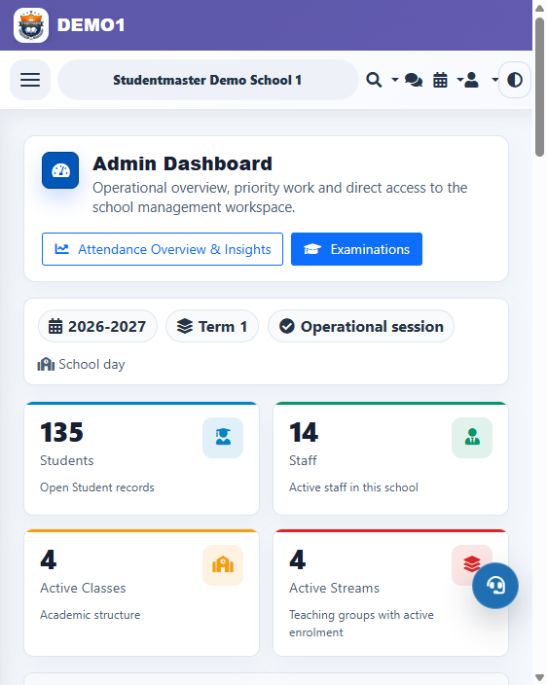
StudentMaster dashboard and operational shortcuts
Choose what to see first

Your demo can focus on the workflows that matter most.

When you book, describe your student population, campuses and priority modules. The team will arrange access and tailor the walkthrough.

Demo access is appointment-based and is not an open public login.