Personalised demonstrations are available by appointment Book your session →
One school community

Give every person the right view of the right information.

Dedicated portal experiences keep guardians, students and staff connected to school life without exposing the full administration workspace.

Focused portal experiences

Connected to school records. Designed for each role.

Portal access turns existing school information into useful, role-appropriate views for the people who need it.

Student portal

Keep learning information clear and accessible.

Students receive an independent workspace designed around their own academic and practical information.

  • Dashboard with GPA and attendance context
  • Published grades and results
  • Class schedule and timetable
  • Fees, payments and balances
  • Profile and notification preferences
  • Secure password recovery
Staff access

Support daily work without unnecessary complexity.

Staff use role-aware modules and self-service workflows for teaching, records and their own employment information.

  • Class and subject workflows
  • Registers, scores and reports
  • Verified attendance
  • Leave requests and staff records
  • Internal communication
  • Account recovery and preferences
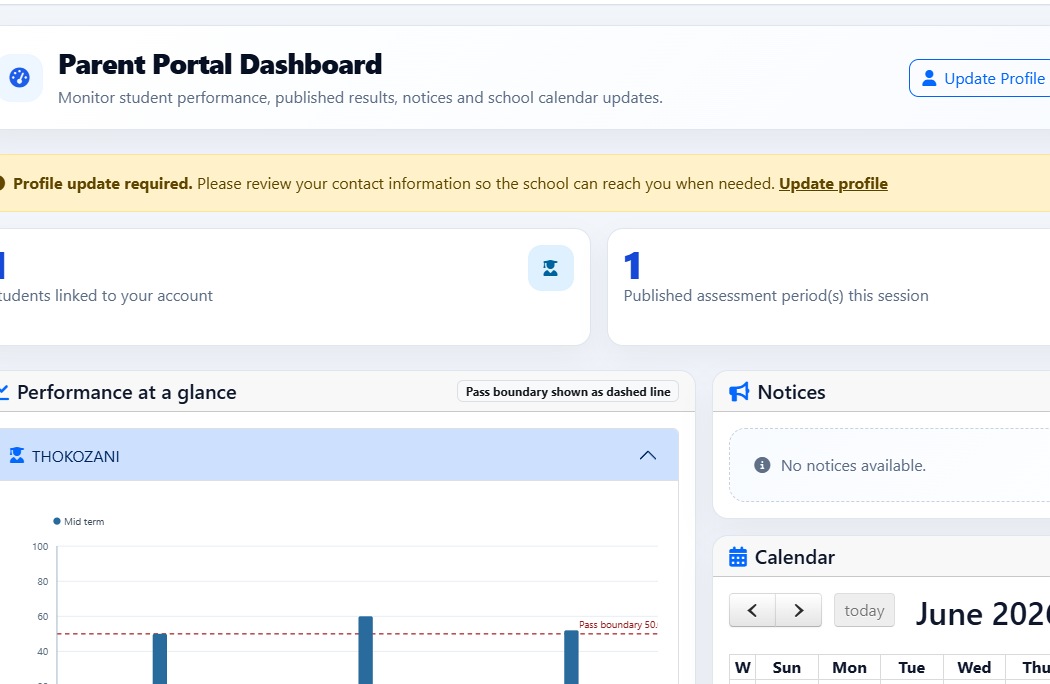
StudentMaster guardian portal showing learner performance, notices and a school calendar
Guardian experience

Progress, school information and support in one place.

Give authorised guardians a current view of the learners connected to them while keeping administrative controls and unrelated records out of sight.

✓ Learner performance and published results✓ Attendance, fees and account context✓ Notices, calendars and messages✓ Profile updates and support requests
Request a portal walkthrough →
Access lifecycle

From invitation to recovery, keep access deliberate.

StudentMaster includes the workflows administrators need to provision, review, recover and revoke portal access responsibly.

01 · PROVISION
+

Create or invite access

Provision student or employee portal accounts and invite authorised guardians for specific learners.

02 · VERIFY
✓

Check role and status

Portal access checks the account type, block status and the relevant learner or staff relationship.

03 · ISOLATE
◇

Separate sessions

Student, guardian and administration sessions remain purposefully isolated from one another.

04 · RECOVER
↗

Support safe recovery

Use role-specific reset and recovery workflows, including controlled offline hand-off where configured.

Communication across the community

Portal access works alongside the school’s communication tools.

Conversations, campaigns, notices, delivery tracking, calendars and support requests help the institution keep each audience informed.

✉

Messages & conversations

Keep relevant communication in role-aware inboxes rather than scattered personal channels.

  • Inbox
  • New conversations
  • Notices
  • Support requests
↗

Campaigns & delivery

Compose targeted campaigns and use delivery dashboards to understand what was sent or needs attention.

  • Audience selection
  • Campaign compose
  • Bulk email
  • Delivery status
See portals in context

Book a guardian and student portal walkthrough.

The team can demonstrate how portal access is provisioned and what students, guardians and staff can see for your chosen plan and school workflow.

Portal access to the demonstration environment is arranged after booking.